
Docs
PriceVenue Documentation
Introduction
PriceVenue is an intelligent revenue management platform designed for short-term rental operators, property managers, and hospitality businesses.
The platform analyzes bookings, demand patterns, lead time, occupancy pressure, and local events in order to generate optimized daily prices for your properties.
PriceVenue connects with Hosthub to import reservations and availability, and then calculates recommended prices that can automatically be pushed back to your channels.
System Overview
PriceVenue consists of three main components:
-
Data Import Layer
-
Pricing Intelligence Engine
-
Automation & Price Push
Workflow:
The system continuously updates pricing based on:
-
bookings
-
occupancy
-
lead time
-
events
-
demand pressure
-
global adjustments
Connecting Hosthub
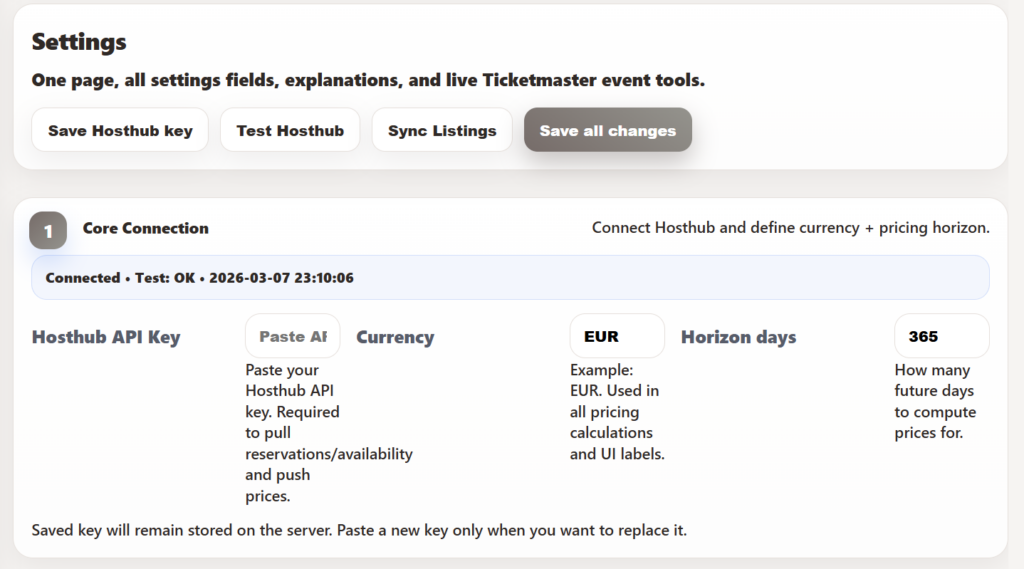
To begin using PriceVenue you must connect your Hosthub account.
Steps
-
Go to Settings → Core Connection
-
Paste your Hosthub API Key
-
Click Test Hosthub
-
Click Sync Listings
PriceVenue will import:
-
listings
-
reservations
-
availability
-
check-in and check-out dates
Once connected, the system will automatically keep your data updated.
Calendar
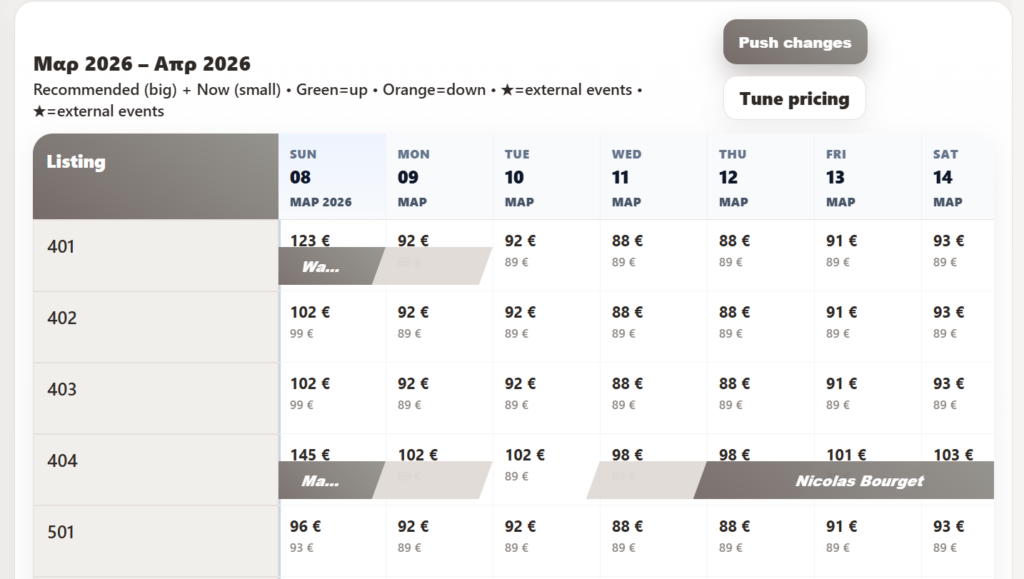
The Calendar is the core interface where you can view pricing recommendations.
Each cell displays two prices:
Recommended Price (large)
The optimal price calculated by the pricing engine.
Current Price (small)
The price currently active in Hosthub.
Color indicators:
| Color | Meaning |
|---|---|
| Green | price increased |
| Orange | price decreased |
| Star | external event affecting demand |
You can:
-
change date ranges
-
filter properties
-
manually override prices
Bookings
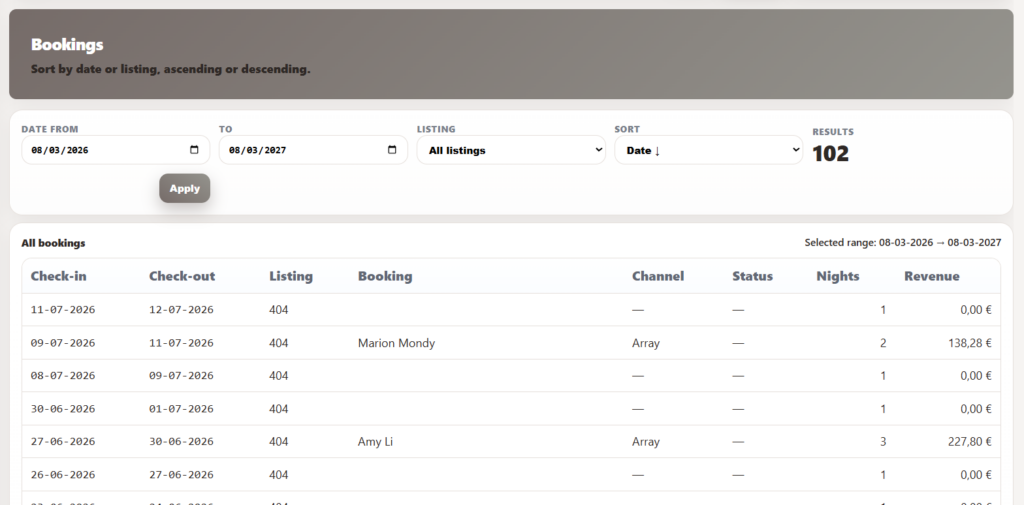
The Bookings page displays all reservations imported from Hosthub.
You can filter bookings by:
-
date range
-
property
-
sorting method
Each row shows:
-
check-in
-
check-out
-
listing
-
guest name
-
channel
-
nights
-
revenue
This page is used to understand booking performance and demand patterns.
Revenue Dashboard
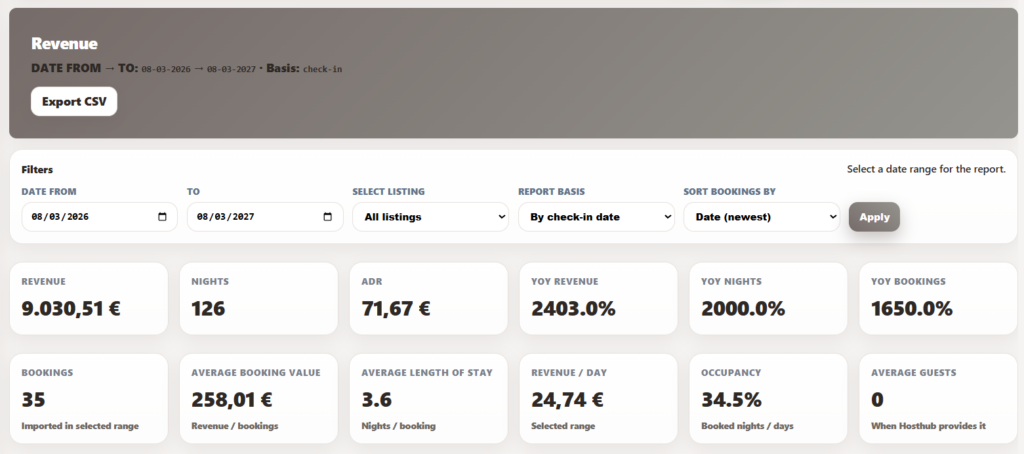
The Revenue section provides performance analytics.
Metrics include:
-
Total revenue
-
Nights booked
-
ADR (Average Daily Rate)
-
Occupancy
-
Average booking value
-
Average length of stay
-
Revenue per day
The dashboard automatically updates based on the selected date range.
Pricing Engine
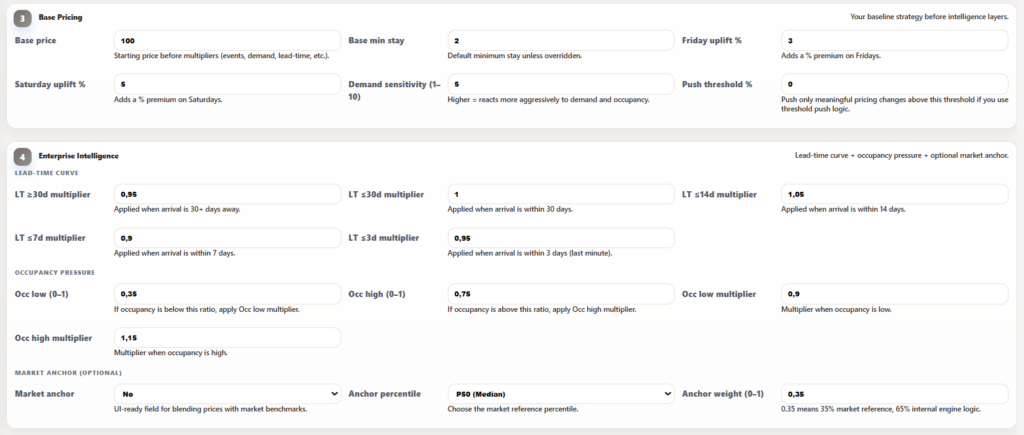
The PriceVenue pricing engine calculates daily prices based on multiple factors.
Base Pricing
The base pricing strategy defines the starting price.
Settings include:
Base Price
Minimum Stay
Friday Uplift
Saturday Uplift
Demand Sensitivity
Example:
Saturday uplift = +5%
Saturday price becomes:
Lead Time Pricing
Lead time adjusts prices depending on how far away the arrival date is.
Example configuration:
| Arrival Window | Multiplier |
|---|---|
| 30+ days | 0.95 |
| ≤30 days | 1.00 |
| ≤14 days | 1.05 |
| ≤7 days | 0.90 |
| ≤3 days | 0.95 |
This allows prices to increase or decrease depending on urgency.
Occupancy Pressure
PriceVenue adjusts prices based on booking pressure.
Example:
High occupancy threshold = 75%
Rules:
If occupancy < 35%
→ price decreases
If occupancy > 75%
→ price increases
Event-Driven Pricing
PriceVenue integrates with the Ticketmaster API to detect events near your properties.
Supported event categories:
-
concerts
-
festivals
-
conferences
You can configure:
-
event boost percentage
-
maximum boost cap
-
distance radius
Example:
Festival boost = +4%
Max daily boost = 15%
Events appear in the calendar with a star indicator.
Market Anchor
The Market Anchor feature allows prices to partially follow market benchmarks.
Example:
Anchor weight = 0.35
Meaning:
65% internal pricing engine
This helps keep prices aligned with the market.
Global Price Adjustment
A global adjustment can be applied after the engine calculates prices.
Example:
Adjustment = +4%
All recommended prices increase by 4%.
Automation
PriceVenue can operate fully automatically.
Automation options:
| Feature | Description |
|---|---|
| Auto push | Automatically send prices to Hosthub |
| Auto repricing | Recalculate prices periodically |
| Event sync | Import events automatically |
Example configuration:
Auto push every 24 hours
Ticketmaster sync every 24 hours
Syncing Prices
To manually push prices:
Click Reprice
Then click Sync
Prices will be sent to Hosthub and distributed to all channels.
External Events
External events are stored in the system and displayed in the calendar.
Each event includes:
-
date
-
title
-
category
-
city
-
source link
These events are used to influence price recommendations.
Best Practices
For optimal results:
-
Set a realistic base price
-
Use moderate demand sensitivity
-
Enable event boosts
-
Allow automation to run daily
-
Review calendar recommendations regularly
Architecture
PriceVenue uses a modular architecture.
Components:
WordPress Plugin Engine
Hosthub API Integration
Ticketmaster Event Engine
Pricing Intelligence Module
Data flow:
Support
For support or questions contact: